
Slack guide
Bring your own Slack app: end users see your name and icon, and conversations run in channels your app creates.
Prerequisites
- A Slack app installed in your workspace, with its bot token (
xoxb-…) and signing secret. The bot needs permission to create channels, invite users, post messages, and add reactions. - An AgentSky API token with write scope.
Create the Slack app
At api.slack.com/apps, choose Create New App:
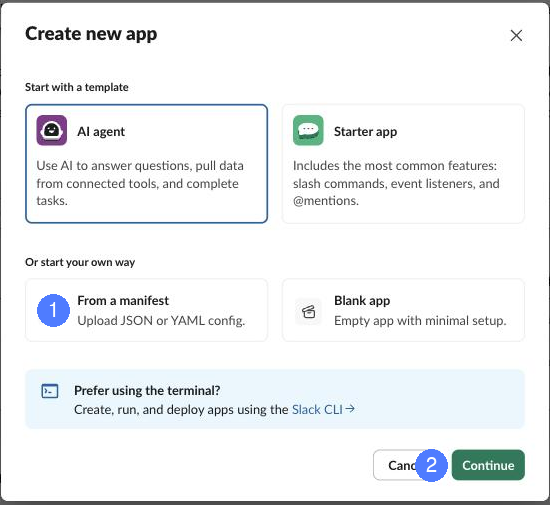
① Pick From a manifest — the developer console hands you a manifest with the bot identity, scopes, and event subscriptions pre-filled · ② Continue, pick your workspace, and install. Then copy the Bot User OAuth Token (OAuth & Permissions) and Signing Secret (Basic Information).
Register the channel app
The developer console runs the same checklist with the manifest copy button and the events URL ready to paste:
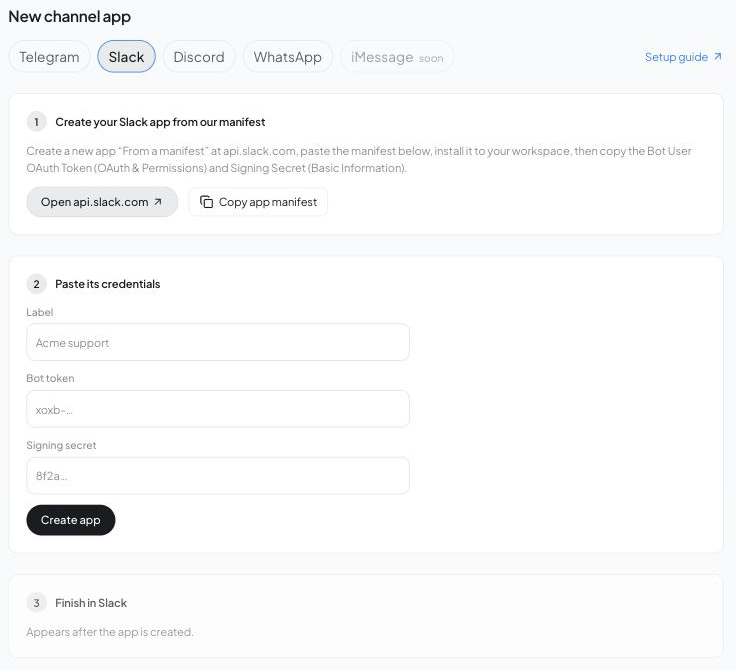
Or over the API:
curl -s -X POST https://api.agentsky.dev/v1/channels/apps \
  -H "Authorization: Bearer $AST_TOKEN" -H 'content-type: application/json' \
  -d '{"platform": "slack", "label": "My app", "credentials": {"bot_token": "xoxb-...", "signing_secret": "..."}}'
# -> setup: { "events_url": "https://.../webhooks/slack/app_..." }
Registration proves the token (auth.test). Slack has no API for webhook config, so paste setup.events_url into your app's Event Subscriptions request URL and Interactivity request URL — Slack's URL verification is answered automatically at that path.
Connect
curl -s -X POST https://api.agentsky.dev/v1/channels/connections \
  -H "Authorization: Bearer $AST_TOKEN" -H 'content-type: application/json' \
  -d '{"platform": "slack", "app": "app_...", "destination": {"session": "sess-..."}, "invite_user": "U012345"}'
For the session destination above, Slack connects synchronously: the call creates a per-agent channel under your app's identity, optionally invites invite_user, posts a greeting, and returns CONNECTED — no pending ceremony.
For a destination.webhook, the response instead includes a pending connection and a connect.code. Send that code in the bot's DM, or invite the bot into the public or private channel you want to connect and send @YourBot LINK:…. Use the exact returned code with one leading mention of your bot and no other text. Replies stay in that conversation's thread. A later speaker's identity remains distinct from the person who connected the channel.
Private-channel follow-ups in the connected thread without another mention require groups:history and the message.groups event. The generated manifest includes both. For an existing app, add the scope and event subscription, reinstall it in the workspace to approve the new scope, and update the registered credentials if Slack issues a new token. The bot must be a member of the private channel; granting the scope alone does not add it. Mention the bot again to start a new top-level conversation. The existing AgentSky shared-app OAuth flow already requests private-channel history access.
Capabilities
| threads | reactions | markers | proactive | markdown | modals | ephemeral | streaming |
|---|---|---|---|---|---|---|---|
| ✓ | ✓ | ✓ | ✓ | ✓ | ✓ | ✓ | ✓ |
Markdown renders as Block Kit; tables become native table blocks.
Troubleshooting
- App creation answers 400
slack_error—auth.testrejected the token; reinstall the app and re-copy the bot token. - Slack's URL verification fails — the events URL must be exactly the returned
setup.events_url(per-app path); the signing secret in your credentials must match the app whose URL you pasted. - Channel name collisions — an existing channel with the generated name is reused rather than failing.