
WhatsApp guide
Bring your WhatsApp Business number through Meta's Cloud API: your WABA, your number, your brand on every message.
Prerequisites
- A Meta Business with a WhatsApp Business Account (WABA) and a registered phone number — you need the phone number id (not the number itself), a System User access token with WhatsApp permissions, and your Meta app's app secret.
- An AgentSky API token with write scope.
Register the channel app
The developer console runs the checklist and shows the callback URL + verify token to paste into the Meta App Dashboard after create:
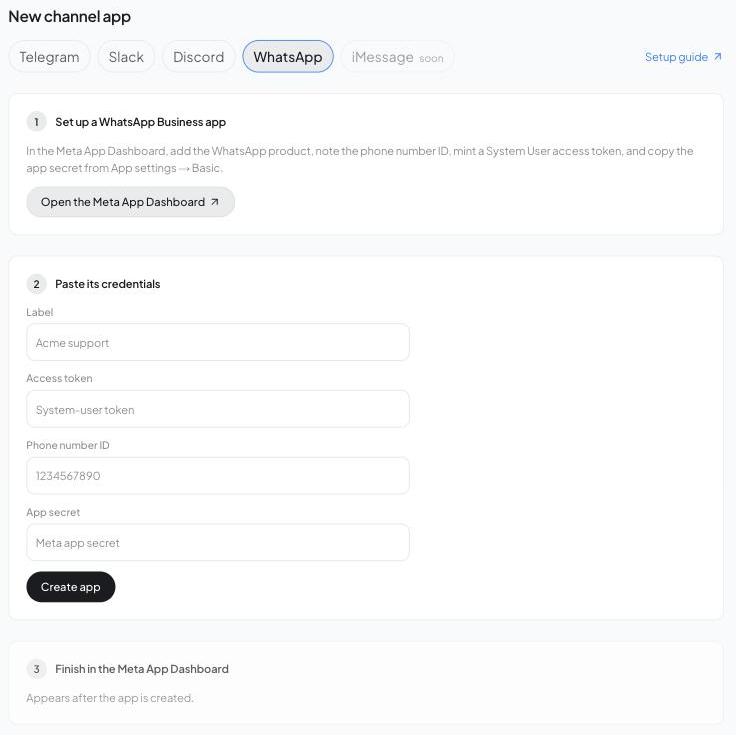
Or over the API:
curl -s -X POST https://api.agentsky.dev/v1/channels/apps \
  -H "Authorization: Bearer $AST_TOKEN" -H 'content-type: application/json' \
  -d '{"platform": "whatsapp", "label": "My number", "credentials": {"access_token": "...", "phone_number_id": "1234567890", "app_secret": "..."}}'
# -> setup: { "webhook_url": "https://.../webhooks/whatsapp/app_...", "verify_token": "..." }
Registration proves the credentials by reading the phone number from the Graph API and stores its display number. Meta has no API for App Dashboard webhook config, so in App Dashboard → WhatsApp → Configuration set the callback URL to setup.webhook_url, the verify token to setup.verify_token, and subscribe to the messages field — Meta's verification challenge is answered automatically.
Connect
curl -s -X POST https://api.agentsky.dev/v1/channels/connections \
  -H "Authorization: Bearer $AST_TOKEN" -H 'content-type: application/json' \
  -d '{"platform": "whatsapp", "app": "app_...", "destination": {"session": "sess-..."}}'
The response's connect.url is a wa.me deep link that pre-fills a LINK: code; sending it to your number claims the connection. WhatsApp connections always require a channel app.
Capabilities
| threads | reactions | markers | proactive | markdown | modals | ephemeral | streaming |
|---|---|---|---|---|---|---|---|
| ✗ | ✗ | ✗ | ✓ | ✗ | ✗ | ✗ | ✗ |
Outbound markdown is converted to WhatsApp's own formatting (*bold*, _italic_) and split to fit message limits.
The customer service window
WhatsApp is user-initiated by design: once a user messages you, Meta opens a limited customer-service window for free-form replies. Outside that window, business-initiated messages must use Meta-approved templates — the channels API posts free-form messages, so proactive sends outside the window will be rejected by Meta. Check Meta's current messaging policy for the exact rules.
Troubleshooting
- App creation answers 400
whatsapp_error— the Graph API rejected the token or phone number id; verify the System User token's WhatsApp permissions and the id (it is not the phone number). - Meta's webhook verification fails — URL and verify token must match
setupexactly; re-run a credential rotation (PATCH /apps/{id}) to mint a fresh verify token if lost. - Proactive sends fail — you are likely outside the customer service window (see above).